Standard Time® vs Acumatica

Acumatica is a true-cloud manufacturing and distribution ERP built for companies that need to replace their accounting system, manage supply chain, and coordinate across multiple locations. Standard Time® is a purpose-built shop floor time tracker — barcode-driven job timers, WIP dashboards, AI scheduling, and job costing at $8.99/user/month, live in one day without a VAR.

See ST Pricing ← All Comparisons
The short answer: Acumatica is a well-designed cloud ERP — if you need to replace QuickBooks, manage a distribution network, or run financials across multiple companies, it's worth evaluating. But if your pain is "we can't see what's happening on the shop floor right now" or "we don't know what our jobs actually cost in labor," Acumatica isn't where you start. Standard Time® solves those problems at $8.99/user/month with no VAR, no implementation project, and no resource-tier guesswork. Many Acumatica shops run Standard Time® alongside their ERP specifically for the scan-station experience.

Standard Time® — Best for

  • Shops that need scan-to-start job time tracking
  • Teams tracking labor cost by work order
  • Operations wanting live WIP dashboards
  • Manufacturers already using QuickBooks for accounting
  • Anyone who wants AI scheduling without a consultant
  • Companies that need to go live this week, not next quarter

Acumatica — Better when you need

  • Your own general ledger and full financial management
  • Multi-company or multi-location coordination
  • CRM, sales order management, and quoting
  • Deep inventory, purchasing, and distribution
  • Unlimited users on the same resource tier
  • A true cloud ERP to replace on-premise software

Pricing — $8.99/User vs $10,000+/Year

Standard Time® Pro is a flat $8.99/user/month with every feature included. Acumatica uses resource-based pricing — not per user — with subscriptions starting around $10,000/year for small businesses. All Acumatica implementations require purchasing through a certified Value-Added Reseller.

Pricing comparison: Standard Time $8.99/user vs Acumatica resource-based pricing from $10K/year
Plan Price What's included
Standard Time® Pro $8.99/user/mo All features — barcode scanning, WIP dashboards, job costing, Gantt charts, AI scheduling, inventory scanning, QuickBooks integration
Standard Time® Enterprise Contact us Everything in Pro + dedicated server, multi-site coordination
Acumatica SaaS (small business) ~$10K+/year Base cloud ERP — financials, inventory, CRM; Manufacturing Edition is a separate add-on; requires implementation through a certified VAR
Acumatica implementation (VAR) $15K–$100K+ Configuration, data migration, training, go-live support; billed separately by the reseller; required for all Acumatica purchases
Real-world cost for a 10-person shop: Standard Time® Pro = $89.90/month — all features, no setup fees, live today. Acumatica for 10 users: starting subscription ~$833/month, plus a VAR implementation project that typically runs $15,000–$50,000 for a small manufacturer. For a small shop, that implementation cost alone exceeds Standard Time®'s total cost for years.

Feature Comparison

Standard Time® leads on shop floor scanning and ease of use; Acumatica leads on financial management and distribution breadth. These are different tools for different primary problems.

Feature matrix comparing Standard Time and Acumatica manufacturing capabilities

Standard Time® Strengths

Scan barcodes to start timer for work order
Scan-to-Start Job Timers

One scan starts a job timer — no menus, no logins. Acumatica's Manufacturing Edition has shop floor data collection, but it requires the full ERP context, a VAR to configure, and weeks of setup.

Time logs view
Job Costing by Labor Hours

Every scan creates a time log tied to a work order, task, and employee — ready for job costing and QuickBooks sync. No manual entry, no batch upload.

AI scheduling chat
AI Scheduling in Plain Language

Type "reschedule all jobs for customer Acme by deadline priority" and the AI updates the Gantt. Acumatica has no equivalent natural language scheduling capability.

Gantt chart production scheduling
Works Alongside QuickBooks

Standard Time® integrates directly with QuickBooks Online — actual labor from barcode scans flows into QuickBooks automatically. No need to replace your accounting system.

Where Acumatica Has More Depth

  • Full general ledger and financial reporting
  • Accounts payable and receivable management
  • Multi-company and multi-currency consolidation
  • Native CRM and sales order quoting
  • Advanced inventory and distribution management
  • Purchasing, receiving, and vendor management
  • True cloud-native architecture (no server required)
  • Resource-based pricing — unlimited users at same tier
The tradeoff: Acumatica replaces your accounting system and runs distribution — that's its core job. If that's your problem, it's a strong choice. But if you just need to know what's happening on the shop floor and what your jobs cost in labor, Acumatica is far more than you need — and far slower and more expensive to get running.

Shop Floor Scanning — Built-In vs Bolt-On

Standard Time® was designed from the ground up around the barcode scan. One scan, one timer, one time log — no ERP context required. Acumatica's shop floor data collection lives inside a full Manufacturing Edition implementation.

Starting a job timer by scan

Standard Time scan barcodes screen — timer started for work order 10200, Weld operation

Scan the employee barcode, then the work order — the timer starts immediately. The screen confirms: Started: Work Order 10200, Weld. No typing, no menus, no delays.

Stopping the timer

Standard Time scan barcodes screen — timer stopped for employee Buzz

Scan STOP and the timer stops. The time log is written — employee, work order, task, actual hours — ready for job costing and QuickBooks sync.

Standard Time® — Job Time Scanning

  • Employee ID barcodes (username)
  • Work order / job number labels
  • Task labels (Weld, Inspect, Fabricate…)
  • STOP barcode to end any timer
  • Inventory items (INV-SUB, INV-ADD, INV-BUILD)
  • Custom barcodes via Barcode Rules

Camera capture — use any phone, tablet, or notebook camera. No dedicated scanner hardware required.

RFID tap — tap a badge or work order traveler to start a timer instantly.

Voice recognition — speak the job number to the scanner.

Acumatica Shop Floor vs ST Scanning

Acumatica's Manufacturing Edition includes shop floor data collection, but:

  • Requires the Manufacturing Edition (separate add-on)
  • Must be purchased and configured through a VAR
  • Setup requires the full ERP implementation — not standalone
  • No AI natural language scheduling
  • No voice recognition scanning out of box
  • No dedicated WIP display for wall-mounted shop screens

Standard Time® is a complete, standalone shop floor tracker — no ERP required, no VAR required, ready the day you sign up.

Time Logs, Timesheets & AI Scheduling

Every barcode scan creates a time log tied to a specific work order, task, and employee. That data flows into job cost reports, timesheets, Gantt charts, and AI scheduling — automatically, with no manual entry.

Time logs by work order

Standard Time time logs view showing start/stop times by work order and employee

Every scan creates a time log showing work order, task, employee, start time, stop time, and actual hours — ready for job costing without any manual data entry.

Timesheet — shop floor & office combined

Standard Time timesheet view showing projects with Mon–Sun hour columns

The timesheet combines barcode scans from the shop floor with manual entries from office staff — engineers logging design hours, supervisors tracking oversight time, managers, sales, and executives all contributing to the same job cost picture.

AI chat — analyze and reschedule

Standard Time AI chat interface analyzing project schedule

Ask the AI to analyze your schedule, identify overloaded employees, or reschedule jobs by deadline priority — in plain language. Acumatica has no equivalent AI scheduling feature.

Gantt chart — production scheduling

Standard Time Gantt chart showing production schedule across multiple work orders

Drag-and-drop Gantt charts for production scheduling. Rearrange jobs, adjust deadlines, and see the impact instantly — or ask the AI to do it.

Resource allocation & capacity

Resource allocation bar chart showing over and under-allocated employees

See immediately which employees are over- or under-allocated. Color-coded capacity bars let you rebalance the schedule before it becomes a bottleneck.

One Day vs 3–6 Months

Standard Time® is designed to be running the day you sign up. Acumatica requires purchasing through a VAR and a multi-month implementation project before you scan your first barcode.

Setup time comparison: Standard Time live in one day vs Acumatica 3-6 month VAR implementation

Standard Time® Setup

  1. Sign up and create your account
  2. Add users and assign employee barcodes
  3. Use the Project Assistant to create work orders in 3 steps
  4. Print job labels and mount a scan station (tablet or PC)
  5. First scan — timers and job costing are live

Live in under one day. No VAR or consultant required.

Acumatica Typical Implementation

  1. Select and contract with a certified VAR/reseller
  2. Business process review and module scoping
  3. Chart of accounts setup and financial configuration
  4. Data migration (customers, inventory, open orders)
  5. Manufacturing Edition configuration (if applicable)
  6. User acceptance testing and staff training
  7. Go-live and VAR hypercare period

Typical timeline: 3–6 months. Acumatica cannot be purchased directly — a certified Value-Added Reseller is required for all sales and implementations.

Creating a job in Standard Time® — 3 steps

Standard Time Project Assistant wizard — welcome screen showing 3-step setup: add project, add tasks, choose client

The Project Assistant walks you through creating a new work order or job in three steps — add the project, add tasks, optionally assign a client. No configuration, no data model to understand first.

Acumatica: Work Orders Require Full ERP Context

Before you can create a work order in Acumatica Manufacturing Edition, you need:

  • A configured chart of accounts (financial setup)
  • Inventory items defined with BOMs and routings
  • Work centers and machine calendars configured
  • Warehouse locations and lot/serial tracking set up
  • A VAR to guide the entire configuration

None of this is wrong — it's the right approach for a full ERP. But if you just need a job timer on the shop floor, it's months of work before you scan your first barcode.

Right-Sized Tool vs Cloud Manufacturing ERP

Standard Time® and Acumatica solve different problems at different scales. Understanding which one matches your actual pain is the whole comparison.

Standard Time right-sized shop floor tool vs Acumatica full cloud manufacturing ERP

Acumatica is a well-built cloud ERP with a genuine advantage in one area: it's truly cloud-native. There's no on-premise server to maintain, user counts don't affect your subscription cost directly, and it runs on any device with a browser. For companies migrating off legacy on-premise ERP systems, that's meaningful.

But Acumatica's scope is also what makes it the wrong starting point for most small and mid-size manufacturers with a shop floor problem. Before a single job timer runs, you're committing to a VAR relationship, a months-long implementation, and a subscription that starts around $10,000/year. The shop floor data collection module — the part you actually need — comes after the financial, inventory, and CRM setup is done.

Standard Time® takes the opposite approach. The entire product is built around one interaction: scan the employee badge, scan the work order, time runs. Job costing, WIP dashboards, Gantt scheduling, and QuickBooks sync are all downstream of that scan. Setup is one day, not one quarter.

Notably, Standard Time® is designed to complement your existing accounting software, not replace it. If you're running QuickBooks, Standard Time® integrates directly — actual labor from barcode scans flows into QuickBooks automatically. If you're an Acumatica customer who needs simpler scan-station software for the shop floor, Standard Time® can run alongside Acumatica as a dedicated time-capture layer that feeds data wherever you need it.

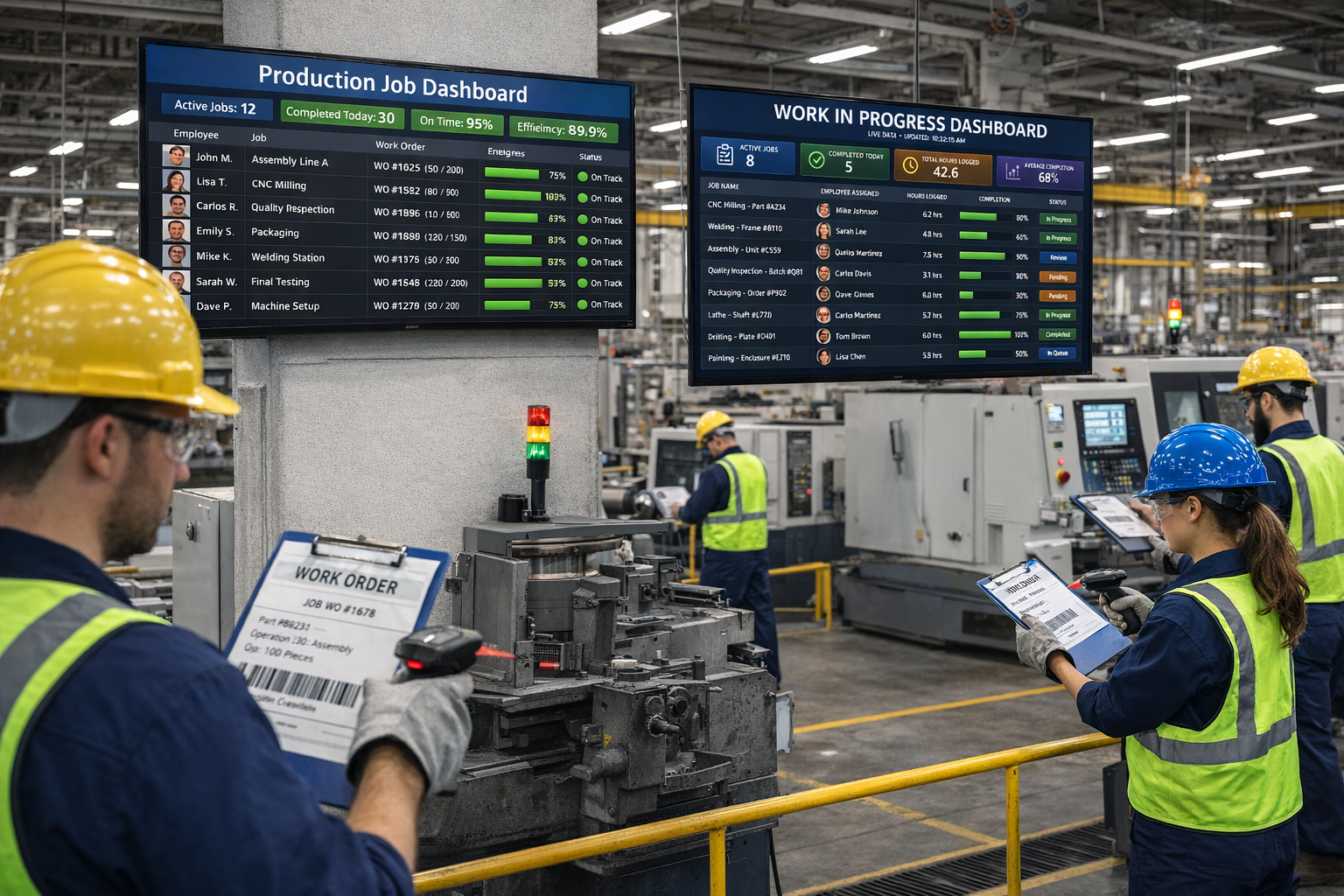
Manufacturing shop floor with barcode scanning and real-time dashboards

Which One Should You Choose?

🏭

Choose Standard Time® if you…

  • Need scan-to-start job time tracking today
  • Want to know what every job costs in labor
  • Use QuickBooks and want to keep it
  • Want WIP dashboards on shop-floor screens
  • Have 5–100 employees on the shop floor
  • Want AI scheduling without a multi-month project
Start Free Trial
☁️

Consider Acumatica if you…

  • Need to replace your accounting system
  • Coordinate across multiple companies or locations
  • Require native CRM and sales order management
  • Need deep inventory and distribution management
  • Have a 3–6 month implementation budget and timeline
Talk to Our Team

Get Shop Floor Visibility at $8.99/User/Month — Live Today

Standard Time® Pro includes barcode scanning, WIP dashboards, AI scheduling, Gantt charts, job costing, and QuickBooks integration. No VAR, no implementation project, no complexity tax.

See Pricing & Plans Ask a Question